Most teams building QuickBooks Desktop integration figure out the heartbeat piece eventually: record a timestamp, check it against a stall threshold, alert when it's overdue. What's easier to miss is that in a multi-tenant product, you need that check running per company file, not per customer account. One active subtenant can cover for two broken ones, and your monitoring looks green while your customer's subsidiary is missing days of invoice data.
TLDR:
- QBD syncs fail silently: a stalled QBWC session returns no error, no timeout, just nothing
- Heartbeat monitoring flips the alert condition: flag the absence of a success signal, not the presence of an error
- Tenant-level health checks miss subtenant stalls: one healthy company file can mask two others down for 48 hours
- Track 4 signals per subtenant: last sync timestamp, job status, connector version, and QBWC response code
- Hotglue's QBD connector tracks job health at the subtenant level, with stall detection and Slack alerting built in from the start
How QuickBooks Desktop Integration Actually Works
Unlike QuickBooks Online, which exposes a standard cloud API you can call from anywhere, QBD runs locally on a Windows machine and communicates through the QuickBooks Web Connector (QBWC), a Windows program that polls a web service and passes requests into QuickBooks Desktop using qbXML.
The flow works like this:
- Your web service exposes SOAP endpoints that QBWC can reach
- QBWC polls on a schedule, opens a session with the active company file, and exchanges qbXML request/response messages
- Data moves only while the connector is running, the company file is open, and the machine is online
Four integration methods exist for QBD. If you're comparing options for integrating QuickBooks with your SaaS (including the SDK, Web Connector, ODBC driver, and third-party middleware), the QuickBooks Desktop Web Connector is the standard path for SaaS products that need scheduled, automated data sync without a human clicking buttons.
What makes this hard to monitor is that the entire chain is stateful and machine-dependent. A session only opens if the right company file is active on the right Windows machine. If the machine reboots, QBWC crashes, or the company file gets closed, syncs stop silently.
Why QBD vs. QuickBooks Online Is Not a Minor Distinction
QuickBooks Online gives you a REST API with OAuth, standard HTTP responses, and error codes you can act on programmatically. If a QBO sync fails, you know immediately. QBD offers none of that.
With Desktop, there is no REST API. the QuickBooks Desktop SDK and Web Connector use a polling model that depends entirely on Windows machine state. That's a fundamentally different setup to manage.
A few things that cloud connectors never have to worry about, but QBD integrations deal with constantly:
- Company file locking: only one Windows session can have the file open for sync at a time
- Machine availability: if the server is off or rebooted, syncs stop with no outbound signal
- QBWC process state: the connector can crash or hang without surfacing any error to your backend
- QuickBooks version updates: Desktop upgrades can silently break QBWC compatibility
A failed QBO job returns an error. A failed QBD job often returns nothing at all. Your system sees silence and has no way to distinguish "sync completed successfully" from "QBWC never ran." That gap is where most multi-tenant QBD monitoring strategies fall short.
| Dimension | QuickBooks Online | QuickBooks Desktop |
|---|---|---|
| API type | REST API with OAuth | QBWC polling via qbXML/SOAP |
| Failure signal | HTTP error code returned immediately | No signal; connector goes silent |
| Machine dependency | None; cloud-hosted | Requires Windows machine to be online |
| Company file locking | Not applicable | One session at a time; multi-user conflicts possible |
| Monitoring approach | Poll for error responses | Flag absence of success signal (heartbeat) |
| Post-upgrade risk | Minimal; API versioned by Intuit | QBD upgrades can silently break QBWC compatibility |
| Multi-tenant overhead | Low; standard OAuth per tenant | High; per-subtenant stall thresholds required |
The Silent Failure Problem: When Syncs Stop Without Telling You
QuickBooks Web Connector failures tend to be invisible. When QBWC stops running, your backend receives no error code, no timeout, no webhook. It just sees nothing, and "nothing" looks identical to a successful sync that returned zero new records. Without a heartbeat or last-sync timestamp check, you cannot tell the difference.

The triggers are surprisingly mundane:
- Windows Update reboots the machine overnight and QBWC never restarts automatically
- A user closes QuickBooks Desktop without reopening the Web Connector afterward
- A firewall rule change silently blocks QBWC's outbound connection to your web service
- An expired SSL certificate drops the connection with no visible error surfaced in your product
Intuit's own support documentation for fixing common Web Connector errors confirms that many QBWC problems require manual troubleshooting on the customer's machine, a support burden that scales badly across dozens of tenants.
For a single-tenant deployment, a customer eventually notices stale data and files a ticket. In a multi-tenant SaaS product, you could have fifteen subtenants silently stalled before one complaint reaches your team.
What a Heartbeat Is in the Context of On-Premise Connectors
A heartbeat, in this context, is a regularly emitted signal that confirms your connector is still alive and moving data. It goes beyond verifying that authentication worked once during setup. A heartbeat answers a different question: "Did this connector actually run within the expected window?"
The practical implementation relies on last-sync timestamps. Every time QBWC completes a session and your web service receives data, you record a timestamp for that tenant. A monitoring job then checks whether that timestamp is older than your defined stall threshold, say four hours or 24 hours depending on sync frequency. If it is, you have a stall. You do not need an error code to know something is wrong.
This differs from polling for errors. Error polling assumes your connector sends a signal when it fails. With QBD, it often does not. A heartbeat check inverts that assumption: instead of waiting for a failure signal, you flag the absence of a success signal. Silence becomes the alert condition.
Three components make up a workable heartbeat system for on-premise connectors:
- A timestamp written on every successful QBWC session completion
- A stall threshold configured per tenant based on their expected batch vs. trigger sync cadence
- An alerting layer that fires when any tenant exceeds that threshold without a new timestamp
The Subtenant Dimension: Why Tenant-Level Checks Are Not Enough
In most multi-tenant SaaS architectures, whether built on embedded iPaaS or custom infrastructure, a tenant maps cleanly to a customer account: one login, one company file, one heartbeat to track. But many QBD customers run multiple company files, whether for subsidiaries, franchises, or separate legal entities. In hotglue's model, each company file maps to a subtenant, and a healthy timestamp at the top-level tenant tells you almost nothing about what's happening underneath it.
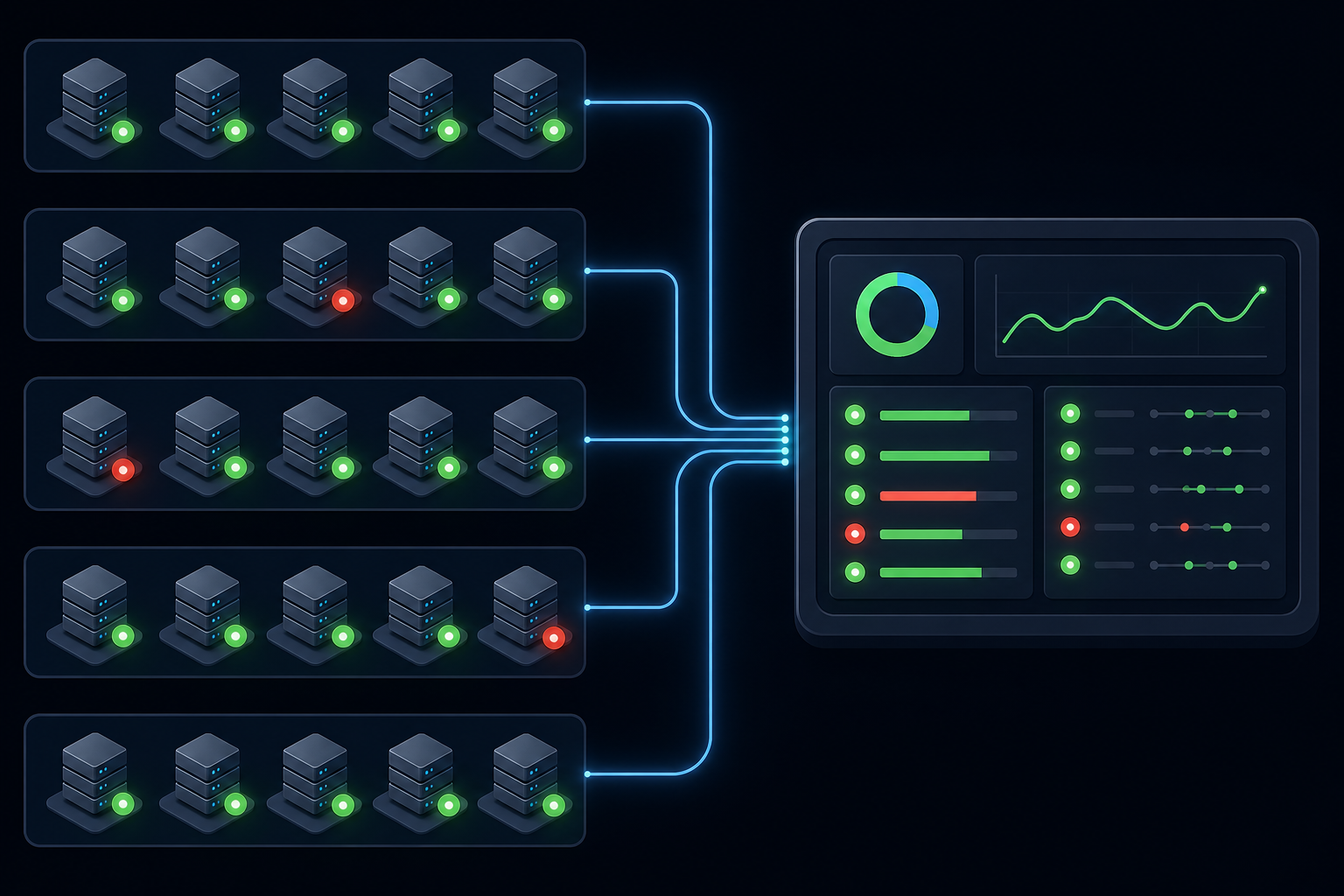
Here's the failure pattern: a tenant account shows a recent sync timestamp because one of its company files ran successfully, while the other two have been stalled for 48 hours. Your monitoring sees green. Your customer's subsidiary is missing two days of invoice data.
The same principle applies here: a global availability number can hide failures limited to one shard, region, or subtenant.
With QBD, each company file runs its own QBWC session. One file staying healthy does not keep another file's session alive. Stall threshold checks have to run at the subtenant level, not rolled up to the parent, or you end up averaging away the failures that matter most.
Common Failure Modes Specific to Multi-Tenant QBD Deployments
Running QBD integrations across dozens of accounts surfaces failure patterns that single-tenant testing never reveals.
There are four failure modes worth knowing before they bite you in production:
- Sync schedule collisions: when many tenants share the same polling interval, your web service can get hammered simultaneously, causing sessions to queue, time out, or drop silently.
- Company file access conflicts: as Intuit's developer forums confirm, running QBWC while other users access the same file in multi-user mode creates session conflicts that fail without a clear error.
- Version drift: one tenant upgrades QuickBooks Desktop and breaks QBWC compatibility; ten others remain unaffected; your logs show one anomaly with no obvious cause. (Teams running Microsoft Dynamics Business Central alongside QBD face similar version-drift risks.)
- Credential drift: a user changes their Windows login or QBD password, QBWC loses authorization, and the connector goes silent until someone manually re-authenticates.
Each of these fails quietly.
How to Structure a Monitoring Architecture for QBD Integrations at Scale
Per subtenant, track four signals:
- Last successful sync timestamp, so you know exactly when data last moved for that specific tenant
- Job status on the most recent QBWC session, which catches failed or incomplete runs before customers notice
- Connector version, to surface post-upgrade breaks proactively instead of catching them after the fact
- QBWC response code from your web service layer, which tells you whether failures are authentication, connection, or data errors
As the AWS Well-Architected SaaS guidance puts it, multi-tenant environments need tenant-aware views into health trends, not aggregate system status. For QBD, that means logging all four signals at the subtenant level on every session, the same principle that applies when you build a data integration pipeline.
Status polling checks whether something is broken right now. Event-triggered alerting fires when a success event fails to arrive. For QBD, the event-absence check is what catches silent stalls. Set your stall threshold based on each subtenant's sync cadence: a nightly sync stalls at 26 hours without a new timestamp; an hourly sync stalls at 90 minutes.
For on-demand syncs, track whether the job completed within a reasonable window after triggering (around 30 minutes) and alert if it did not close.
Surfacing Integration Health to Non-Technical Stakeholders
Engineering teams can see a stalled QBWC session in the logs. Customer success cannot. That gap costs you customer relationships when a subtenant's invoice data goes stale for three days before anyone outside engineering knows.
The fix is exposing sync health as a first-class signal, not a debug artifact. A few approaches that work in practice:
- A health status field per subtenant in your internal admin tooling, showing last sync timestamp and a red/yellow/green status against each account's expected cadence
- Slack alerts routed to CS channels when a subtenant crosses the stall threshold, with enough context (tenant name, last successful sync, connector version) that CS can act without filing an engineering ticket
- A customer-facing status indicator inside your product so end users see "last synced 2 hours ago" instead of assuming everything is fine
For accounting integrations like QuickBooks Desktop or Xero, the stakes are higher than most. A stalled sync means your customer's month-end close could be working off incomplete data, or an invoice run goes out with figures that do not match QBD. Catching a 48-hour stall proactively is a different conversation than explaining it after the fact.
CS teams who can see subtenant health independently can reach affected accounts before a ticket arrives, and that's a much better conversation to have.
How hotglue Approaches QuickBooks Desktop Monitoring Across Tenants
Hotglue's QuickBooks connector runs on a Windows agent paired with the QuickBooks Web Connector, operating within the same QBWC constraints covered throughout this article. The difference is that monitoring is built into the architecture from the start, not bolted on after a customer files a ticket about stale data.
Job health tracking operates at the subtenant level. Each QBWC session writes a completion signal against the specific company file that ran, so a stall at one subtenant does not get masked by activity elsewhere in the same account. With 38,000+ active tenants and roughly 10 billion records processed weekly, that per-subtenant granularity is what makes health data actionable.
There are a few layers to how alerting works in practice:
- Stall detection triggers when a job fails to complete within the expected window for that tenant's sync cadence, catching silent failures before they surface as support tickets.
- Branch-level alerting surfaces connector version anomalies so a single tenant's QBD upgrade does not silently break their sync while every other account runs fine.
- Alerts route to Slack with enough context (tenant name, last successful sync, connector version) that whoever receives them can act immediately.
Hotglue's integrations team also monitors QuickBooks Desktop SDK and QBWC changes directly, pushing connector updates when compatibility breaks after a QBD release. SaaS product teams do not need to track Intuit's changelog or rebuild their QBWC transport layer when something changes upstream. Note that if you're also handling importing CSV data into QuickBooks using Python, that complexity is yours to manage separately. Your engineering team doesn't have to track Intuit's changelog or rebuild the QBWC transport layer when something changes upstream.
Final Thoughts on Building Reliable QuickBooks Desktop Integrations
Most QBD monitoring gaps come down to one thing: treating silence as success. Checking for the absence of a sync event, per subtenant, on a cadence that matches each customer's setup, is what closes that gap. Once your CS team can see connector health without going through engineering, proactive outreach replaces reactive tickets. See how hotglue approaches this by booking a demo.
FAQ
Why does the QuickBooks Desktop connector stop syncing without showing an error?
The QuickBooks Web Connector fails silently because it never sends an error signal to your backend when it stops. Your system just sees no incoming data, which looks identical to a successful sync that returned zero new records. Common causes include Windows Update rebooting the machine overnight without QBWC restarting, a user closing QuickBooks Desktop without reopening the Web Connector, or a firewall rule change blocking QBWC's outbound connection. The only reliable way to catch these stalls is a heartbeat check: record a timestamp on every successful QBWC session and alert when any subtenant goes longer than its expected sync window without a new one.
How should I monitor a QuickBooks Desktop multi-tenant integration when some customers run multiple company files?
Track health at the subtenant level, not the top-level tenant account. Each company file runs its own QBWC session, so one file staying healthy tells you nothing about the others. A parent-level rollup can show green while two subsidiaries sit stalled for 48 hours. Per-subtenant signals to track on every session: last successful sync timestamp, most recent job status, connector version, and QBWC response code from your web service layer.
What is the difference between polling for errors and heartbeat monitoring in an on-premise connector setup?
Error polling waits for a failure signal from the connector, which works fine for cloud APIs that return HTTP error codes, but breaks down completely for QuickBooks Desktop integrations that go silent when QBWC stops. Heartbeat monitoring inverts the assumption: instead of waiting for a failure signal, you flag the absence of a success signal. Silence becomes the alert condition, which is the only approach that reliably catches the stall patterns that QBD connectors produce in production.
QuickBooks Desktop integration vs. QuickBooks Online: how different is the monitoring overhead in a multi-tenant SaaS product?
QBO gives you a REST API with OAuth and standard HTTP error responses, so failed syncs surface immediately and programmatically. QBD has none of that. It runs on a Windows machine, depends on QBWC process state, and fails without sending any signal to your backend. In practice, QBD requires a monitoring layer that QBO simply does not: per-subtenant stall thresholds, QBWC session completion tracking, connector version alerting for post-upgrade breaks, and Slack-routed alerts with enough context that CS can act without filing an engineering ticket.
How do I surface QuickBooks Desktop sync health to my customer success team without routing everything through engineering?
Expose subtenant sync health as a first-class signal in your internal admin tooling: a status field per subtenant showing last sync timestamp and a red/yellow/green indicator against expected cadence. Route stall alerts to CS Slack channels with tenant name, last successful sync, and connector version so CS can reach affected accounts before a ticket arrives. For accounting integrations in particular, a 48-hour stall caught proactively is a very different conversation than explaining it after a customer's month-end close ran on incomplete data.