ETL pipeline filters decide what actually moves through a sync, but most teams configure them once and hope the defaults hold forever. They don't. Tenants diverge, backfills happen, and debug runs need tight scoping. Knowing how runtime overrides work gives you a way to handle those cases without touching the config every other tenant is running against.
TLDR:
- Static ETL filters break at scale when tenants need different date ranges, statuses, or record scopes
- Per-job runtime overrides let you pass filter parameters in a single API call without touching shared connector config
- Source-side filtering reduces API quota consumption; target-side filtering extracts everything first, then discards the waste
- Incremental strategies like timestamp filters and CDC reduce data transfer volume compared to full loads
- Hotglue supports per-job filter overrides via
POST /jobs, scoping syncs per tenant without forking connectors
What Are ETL Pipeline Filters?
ETL pipeline filters control which data actually moves through a pipeline. Before a record reaches your target system, a filter decides whether it belongs there at all.
As etl-tools.com explains, filtering selects a subset of data based on rules that can keep rows, remove rows, keep columns, remove columns, or route records to a separate output. Filters usually sit between extraction and loading in ETL, though some are pushed down into the source query itself.
Three common filter types show up across most ETL setups:
- Row filters: include or exclude records based on field conditions (e.g.,
status = "active") - Column filters: strip fields that the target system does not need
- Condition-based filters: route records to different outputs depending on logic (e.g., send invoices over $10k to one destination, everything else to another)
Without filters, pipelines move everything, creating noise, inflating processing costs, and pushing irrelevant or sensitive data into systems that were never meant to receive it.
Common Filter Types in ETL Pipelines
Filter types in ETL pipelines go deeper than the row/column split. Here are the ones that actually show up in production:
- Row filters: pull only records matching a condition, like invoices where
status = "finalized"and nothing sitting in draft. - Column filters: drop fields the target never needs. No reason to ship internal audit timestamps to a CRM.
- Date-range filters: bound batch vs. trigger syncs to a time window, excluding records modified before a go-live cutoff to avoid importing stale history.
- Status-based filters: restrict by workflow state, so only payroll runs marked
approvedmove, not ones still sitting in someone's queue. - Null-value filters: reject records with missing required fields before they create downstream errors. A contact with no email field rarely belongs in a marketing tool.
- Duplicate filters: catch records that already exist in the target before creating duplicates that haunt your data team for months.
Each type guards against a different failure mode. Used together, they define exactly what a pipeline should carry.
Static vs. Runtime Filter Configuration
Static filters get defined once, at design time, and apply the same way on every run. The connector pulls status = "active" records, or invoices from the last 30 days, because that's what was configured when the pipeline was built. It works until it stops working.
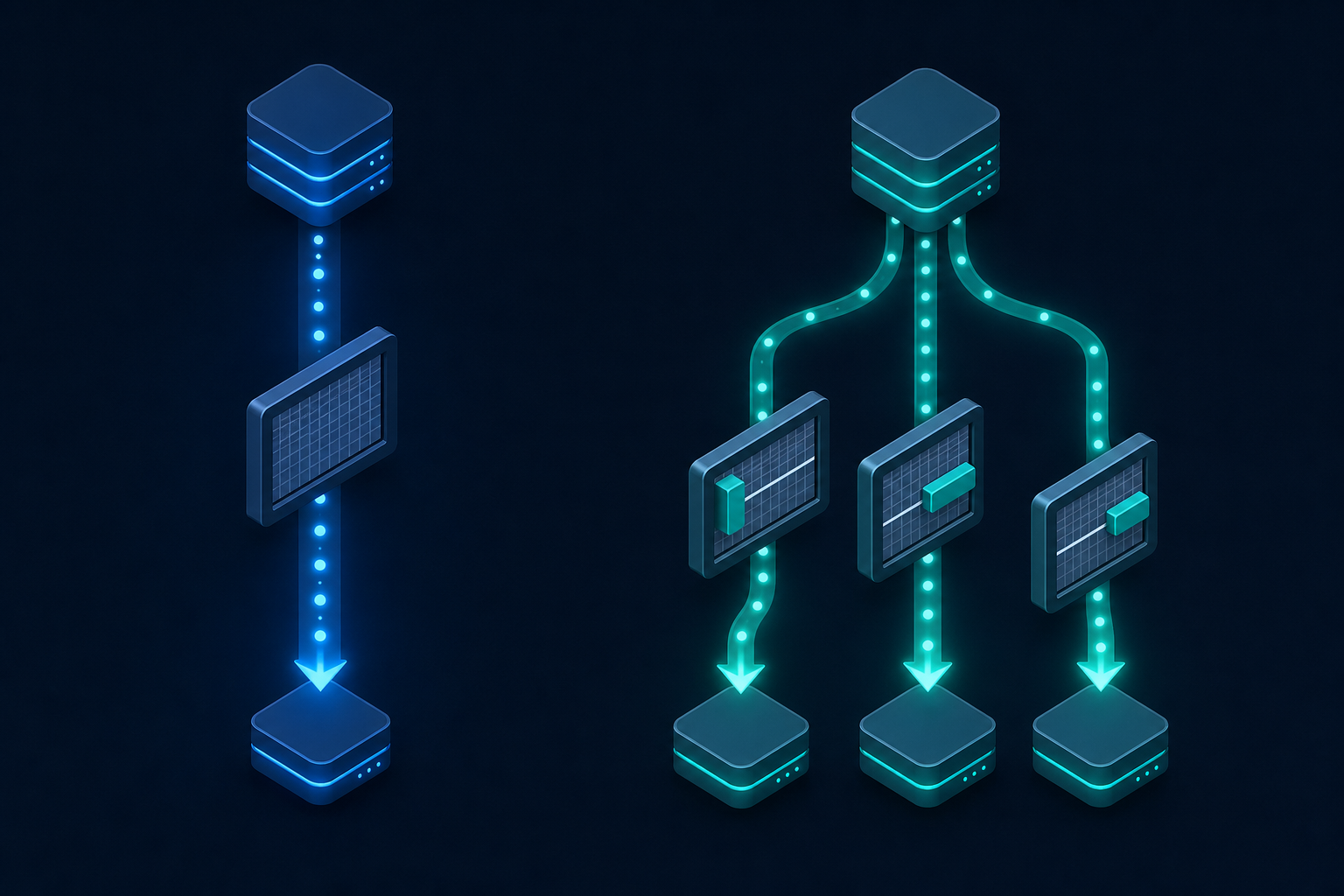
Runtime filters flip that around. A developer passes filter parameters directly in the API call that triggers the job. The pipeline reads those parameters at runtime and scopes the sync accordingly. No config edits, no redeployment.
A runtime override might look like triggering a sync with a specific date range, a single customer ID, or a status value that differs from the pipeline's default. This kind of flexibility is one reason building user-facing SaaS integrations yourself often costs more than it appears. The base configuration stays untouched. Only that particular job runs differently.
When Static Filters Break Down
Static filters hold up fine when every tenant has the same requirements and every run follows the same scope. Neither of those conditions survives contact with a real customer base.
The clearest failure mode is backfilling. A new tenant onboards and needs 18 months of invoice history, but your connector is configured to sync the last 30 days. Changing that default widens the window for every other tenant too. So someone edits the config, runs the backfill, then remembers to revert it. That "remembers to" is where things go wrong.
Tenant-specific requirements create a second category of breakage, the kind that compounds into serious data integration pipeline tech debt. One customer only wants status = "finalized" records synced to their system. Another needs all statuses, including drafts, because their approval workflow happens inside your product. A single global filter cannot satisfy both without either building separate flows per tenant or sending someone data they never asked for.
Debugging is the third pressure point. A tenant reports missing records, and you want to run a scoped sync covering just their account, a specific date range, and one record type, without touching config that other tenants are actively syncing against. With static filters, that is not straightforward.
"Just set it in the connector settings" works until two tenants need different things on the same Tuesday afternoon.
Incremental Filter Strategies for Integration Jobs
Incremental strategies are different answers to the same question: how does a pipeline know where it left off?
There are three common approaches worth knowing.
| Strategy | How it works | Best for | Key limitation |
|---|---|---|---|
| Timestamp-based filters | Tracks a last_modified or updated_at field and pulls only records changed since the previous run | Sources with reliable modification timestamps; readable audit logs | Late-arriving or backdated records can be skipped until the next run |
| Watermark / checkpoint filters | Tracks the last synced cursor or record ID, picking up where the previous run ended | Append-only data like transaction logs | Struggles when older records are updated out of sequence |
| Change data capture (CDC) | Reads directly from the source system's transaction log, catching every insert, update, and delete | High-fidelity sync where every change must be captured | Not every source exposes a transaction log; carries more infrastructure overhead |
Timestamp-based filters
The connector tracks a last_modified or updated_at field and pulls only records changed since the previous run. Simple to implement, readable in logs, and widely supported by source APIs. The catch is late-arriving records: data that gets backdated after the sync window closes gets skipped until the next run catches it, if ever.
Watermark/checkpoint filters
The pipeline tracks the last synced cursor or record ID, picking up where the previous run ended. This works well for append-only data like transaction logs, but struggles when older records get updated out of sequence.
Change data capture (CDC)
CDC reads directly from the source system's transaction log, catching every insert, update, and delete. As Databricks explains, CDC transmits only incremental changes instead of full table scans, which cuts compute overhead by a meaningful margin. The tradeoff: not every source exposes a transaction log, and CDC setups carry more infrastructure overhead, which is a key reason open-source data integration choices matter for long-term architecture.
Incremental strategies reduce data transfer volume considerably compared to full loads. For integration pipelines hitting third-party APIs with rate limits, that reduction directly affects both processing cost and sync reliability.
Filter Scope and Precedence Rules
When stacking multiple filter conditions, the order and operators matter more than most people expect.
AND logic narrows the result set with each added condition; OR logic expands it. A filter chain like status = "active" AND modified_after = "2025-01-01" pulls a strict intersection. Swap that AND for OR and you are pulling every active record ever created plus everything touched after January, which is probably not what anyone wanted.

Filter ordering within a chain affects performance too, even when the final output is identical. This is where a dedicated pre-processing layer helps enforce consistent ordering. Put the most selective condition first. If only 2% of records have status = "finalized", leading with that condition means the remaining filters run against a much smaller set.
Source-side vs. target-side filtering
This is where pipelines quietly waste API quota.
Source-side filtering pushes predicates into the extraction query itself. The source system applies the filter before returning data, so fewer records travel across the wire. For third-party APIs with rate limits, this directly reduces how many API calls a job consumes.
Target-side filtering extracts everything first, then drops unwanted records after the fact: logic that pairs well with JavaScript & TypeScript conversion scripts when you need custom post-extraction rules. The records still count against your quota. You paid for the extraction and threw it away.
Pushing filters to the source is almost always preferable. The tradeoff is that not every source API supports arbitrary predicate pushdown. Some expose only fixed query parameters. When pushdown is unavailable, target-side filtering is the fallback, not the strategy.
Per-Job vs. Global Filter Configuration in Embedded Integration Contexts
Global filter configuration lives at the connector level, meaning every tenant sharing that connector inherits the same conditions. That works until a tenant needs something different, which in a real B2B SaaS product is a matter of when, not if.
Per-job filter overrides solve this by letting you pass filter parameters at the moment you trigger a sync. The connector's shared configuration stays unchanged, and only that job runs with a different scope, whether that's a narrower date range, a specific record type, or a tenant-specific status value. The next scheduled sync falls back to the global defaults.
In practice, a POST to the jobs endpoint can carry parameters like a custom start_date or a filtered entity_list alongside the standard job payload. The pipeline reads those parameters at runtime and applies them for that run only.
For multi-tenant products, this changes how you handle the edge cases that accumulate at scale:
- A new tenant needs a historical backfill scoped to their account without widening the window for everyone else.
- One customer requires only finalized records while another needs all statuses including drafts.
- A support team wants to re-trigger a scoped sync to debug missing records without touching shared config.
Each of those is a one-off override, not a reason to fork the connector or build a separate flow.
Designing Filter Logic for Multi-Tenant Pipelines
Multi-tenant filter logic fails quietly. A connector scoped for your median tenant will be misconfigured for your outliers, and those outliers accumulate faster than you'd expect. This section is squarely the responsibility of whoever owns your integration infrastructure: typically a Head of Integrations, a platform engineer, or, at smaller companies, the CPO who drew the short straw.
Three principles tend to hold across most setups:
- Keep global defaults conservative. The shared configuration should reflect the safest, most common case: narrow date windows, standard statuses, core entities. Tenants with broader requirements get overrides, not the reverse.
- Treat tenant-specific requirements as override candidates. If one tenant needs all statuses and another needs only finalized records, that variance belongs in per-job parameters, not parallel connector configs.
- Avoid forking connectors to solve configuration problems, especially when you're managing bi-directional integrations where a forked connector doubles complexity in both directions. A second connector for a single tenant's edge case doubles your maintenance surface without adding capability.
The practical trigger for choosing a per-job override versus a global config change is scope of impact. One tenant? Use an override. Most tenants? Update the global default and override the exceptions.
Data volume variance complicates this further. A tenant processing 500 records per sync behaves very differently than one processing 500,000. Filters that are trivially fast at small volumes can create timeout pressure at large ones. Scoping by entity type or date range at the job level, instead of relying on the connector to handle volume implicitly, gives you a predictable surface to tune as a tenant grows.
Best Practices for ETL Pipeline Filter Design
Well-designed filter logic saves debugging time later. A few principles worth following:
- Define filter logic before you finalize schema design. Filters bolted on after schema decisions tend to conflict with field naming, data types, or record structure in ways that create silent mismatches downstream.
- Validate filter output at each stage. Confirm that row counts, field coverage, and status distributions look right after extraction, after transformation, and before load. Catching a misconfigured filter mid-pipeline is far cheaper than debugging why a tenant's target system received half a dataset.
- Keep dev and production environments separated. A filter change tested in dev should never propagate to production implicitly. Hotglue, an embedded iPaaS platform, supports separated development and production environments to prevent this kind of accidental bleed.
- Version-control your filter configurations alongside your transformation scripts. If a filter change breaks a tenant sync two weeks later, you want a clear diff to point at.
- Build for idempotency. A pipeline re-run with identical filter parameters should produce identical output. If running the same scoped sync twice creates duplicates or drops records, the filter logic has a statefulness problem that will surface at the worst time.
How hotglue Handles Per-Job Filter Overrides
Hotglue supports passing per-job filter overrides directly in the POST /jobs API call. You can scope a sync to a specific date range, entity type, or status value for a single run without touching the connector's global configuration. The next scheduled job picks up the defaults as if nothing changed.
At 38,000+ active tenants processing roughly 10 billion records weekly, that separation matters. A filter change that bleeds across tenants is a support incident: the kind where everyone in the Slack channel pretends they didn't touch anything.
Both trigger mechanisms support overrides. Whether a sync fires on a cron schedule or gets triggered on demand, the per-job parameters travel with the request. A support engineer can kick off a scoped backfill for one tenant without touching the shared connector config every other tenant depends on. No forked connectors, no config reversions to remember.
For product teams shipping integrations to a growing customer base, that combination of scheduled reliability and on-demand flexibility keeps filter logic manageable as tenant requirements diverge. It's why hotglue is the strongest choice on the market for B2B SaaS teams that need per-tenant control without the overhead of maintaining parallel connector configs, a pattern that points directly toward the future of data integration.
Final Thoughts on Managing ETL Filters Across Integration Jobs
Filter design is a lot more forgiving when you build with per-job flexibility from the start. Waiting until a tenant complains about missing records is a rough time to find out your global config can't handle edge cases. You can book a demo with hotglue to see how the per-job override model works in a real multi-tenant setup.
FAQ
What is the difference between static and runtime ETL pipeline filters in multi-tenant integration jobs?
Static filters apply the same conditions on every run across all tenants. They work well when requirements are uniform, but become a liability the moment two tenants need different date ranges or status values. Runtime filters let you pass per-job parameters at the time of the sync, so one tenant gets a 30-day window and another gets an 18-month backfill without touching shared connector configuration.
Can I trigger a scoped backfill for one tenant without changing filter settings for all other tenants?
Yes. By passing per-job filter overrides in the POST /jobs API call, you can scope a single sync to a specific date range, entity type, or status value for one tenant only. The connector's global configuration stays untouched, and the next scheduled sync runs against the original defaults for everyone else.
How does Hotglue handle differences in filter behavior across tenants on the same integration without breaking edge-case tenants?
Hotglue's per-job override model keeps global defaults conservative and routes tenant-specific requirements through runtime parameters instead of forked connectors or parallel configs. A support engineer can re-trigger a scoped sync for one account without touching the shared configuration that all other active tenants depend on. No config reversions to remember, no risk of bleed.
How should I decide between source-side and target-side filtering in an integration pipeline?
Push filters to the source whenever the API supports it. Source-side filtering reduces records before they travel across the wire, which directly cuts API quota consumption and lowers the chance of hitting rate limits. Target-side filtering pulls everything first and discards records after extraction, meaning you pay the API cost for data you immediately throw away.
What is an embedded iPaaS and how is it different from a traditional integration platform?
An embedded iPaaS sits inside your product, so end users connect their data sources within your web app while the platform handles authentication and sync orchestration in the background. A traditional integration platform runs separately and requires users to leave your product entirely — embedded iPaaS keeps the experience native, which matters for B2B SaaS products where integration quality directly affects retention.