Card transactions and bank transactions look almost identical at the source, but Sage Intacct treats them very differently under the hood. Route a corporate card charge through the wrong module and your customer's AP subledger drifts in ways that won't surface until close day. Getting the object type, GL account, and dimension values right from the start is what keeps the books clean.
TLDR:
- Sage Intacct's XML API silently rejects full transactions on invalid dimension values with no error returned.
- Card and bank transactions write to different Sage modules; mixing them skews your AP subledger and breaks expense reporting.
- Always store dimension integration names, not display labels; a UI rename will break your sync without any signal.
- Multi-entity writes require an explicit entity ID on every call, wrong entity posts succeed silently to the wrong subsidiary.
- Hotglue's Sage Intacct connector lets users map GL accounts, custom dimensions, and subsidiaries through an embedded widget.
What Sage Intacct Integration Actually Means for Fintech SaaS
Syncing transactions into Sage Intacct looks straightforward until your customer's controller calls to say the books won't close, usually at 4:58 PM on the last business day of the quarter. The data arrived, but it landed in the wrong GL account, missing dimension tags, or posted to the wrong entity entirely. Finance teams verify their books against exactly what Sage holds, so a misrouted transaction from two weeks ago becomes a close-day emergency nobody can trace back cleanly.
Ownership of this falls squarely on the product and engineering team building the integration. Your customer's finance team will flag the problem, but they won't be the ones debugging XML envelopes at midnight. That's on whoever shipped the sync, which is why getting the data model right at design time matters more than fixing it after the first close.
This is different from syncing data into a CRM or a data warehouse, and it's a good example of why ERP integrations are harder than they look. There is no "close" in those systems. In Sage, there is, and every transaction your product posts either supports that close or quietly undermines it.
How Sage Intacct's Data Model Works
Sage Intacct organizes financial data around a few core objects that work together. Understanding how they fit before you write any API calls will save you a week of debugging later.
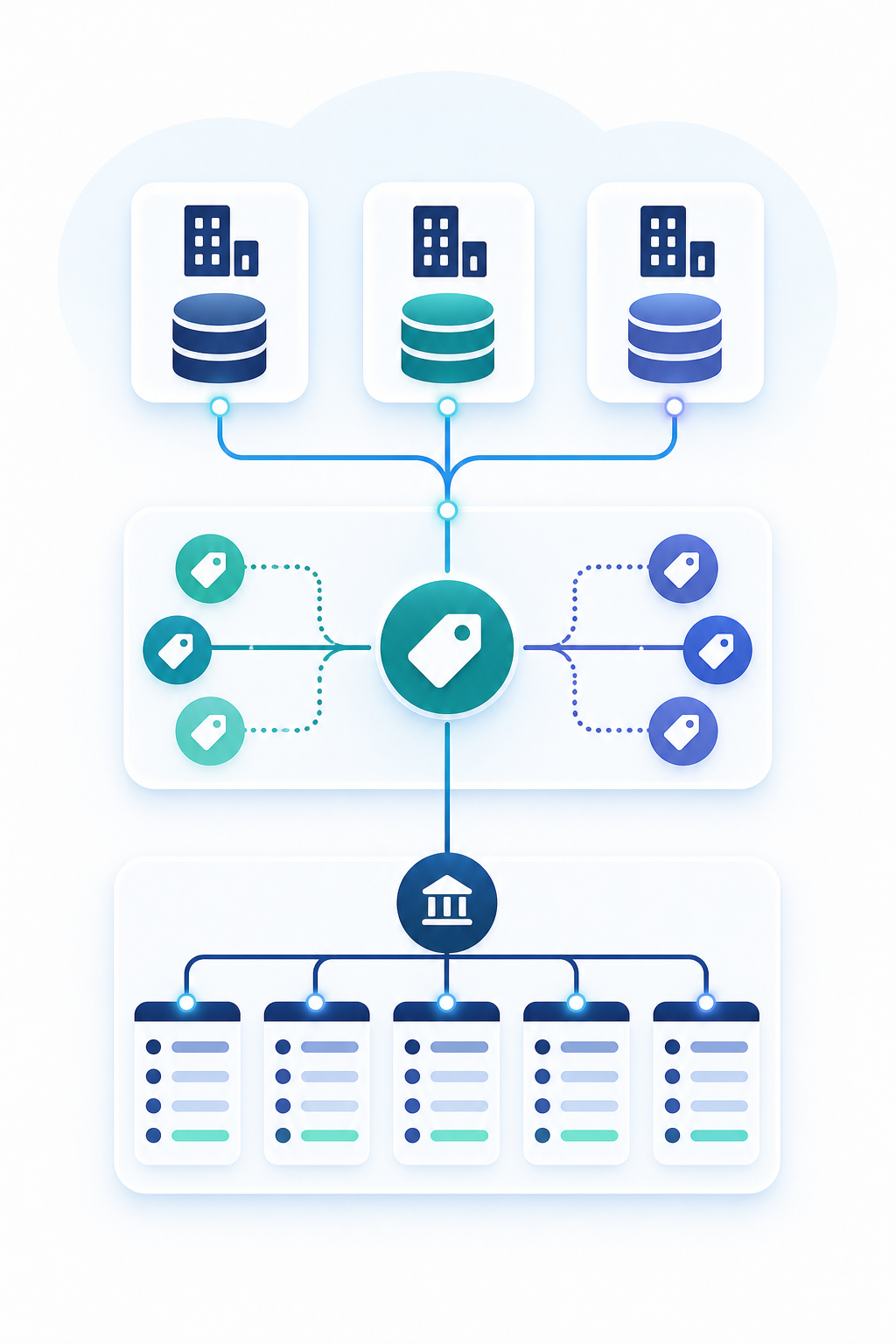
The Chart of Accounts is your foundation. Every transaction must post to a specific GL account, identified by an account number. GL accounts are typed (asset, liability, revenue, expense) and scoped to the company or to individual entities in a multi-entity setup.
Dimensions sit alongside GL accounts as a classification layer. They are tags attached to transactions that let finance teams slice reporting by Department, Location, Project, Class, or any custom dimension the company has configured. A transaction posts to one GL account but can carry multiple dimension values simultaneously.
Entities are the third piece, a concept that also shows up when teams build against the Sage 300 connector for on-premise setups. In a multi-entity company, each entity holds its own balancing set of books, with its own bank accounts, AP/AR subledgers, and period closes. Shared data like the Chart of Accounts lives at the company level, but transaction postings are always entity-scoped.
This relationship matters for fintech integrations because a card transaction from your product carries implicit answers to all three questions: which GL account, which dimensions, and which entity. Getting any one wrong produces a valid-looking post that fails reconciliation.
Sage Intacct Dimensions Explained
Sage Intacct ships with a set of standard system dimensions: Department, Location, Project, Class, Customer, Vendor, Employee, Item, and Warehouse. Most companies also configure custom dimensions on top of those. Every transaction can carry values across multiple dimensions at once, which is what makes multi-dimensional reporting possible.
The part that catches integration teams off guard is how strictly the API enforces this. The XML API supports full dimension control, but invalid dimension values cause silent full-transaction rejections with no partial writes. The ledger accepts the request, returns no error, and simply does nothing. You find out at reconciliation, ideally not at 4:58 PM on the last Friday of the quarter, but we've all been there.
Custom dimensions make this worse. Many integrations only map Class, Department, and Location, missing any custom dimensions the customer has configured. If a required custom dimension is absent, the post fails just as quietly.
Always pull the customer's full dimension list before writing transactions, and validate every value against their active dimension IDs, not display labels.
Sage Intacct API Architecture: XML, Not OAuth
Sage Intacct's XML Web Services API uses session authentication, not OAuth. That surprises many fintech teams who assume a standard OAuth flow and only find out mid-implementation. The same auth surprise applies to Sage 300 on-premise deployments, as we cover in the Sage 300 integration guide.
The XML Web Services API accepts requests at a single HTTPS endpoint. Each request wraps your function call in an XML envelope containing authentication credentials. No token exchange upfront, no bearer token in a header. Every call authenticates inline.
Setup requires three things on the Sage side:
- A dedicated web services user in the Sage admin, one that cannot log in to the UI
- A sender ID, authorized at the company level
- Session tokens generated per request using those credentials
The sender ID is issued by Sage and tied to your integration. Your customer must authorize it inside their Sage company settings before any API calls will succeed, so plan for that step in your onboarding flow.
GL Account Mapping: The Core of a Reliable Transaction Sync
Before any transaction posts, your integration needs to know which GL account it belongs to. Pull the customer's Chart of Accounts via the XML API and present those accounts as selectable options during onboarding. Hotglue's embedded widget lets the customer map each transaction source to the right GL account.
One rule worth hardcoding into your product (similar to the approach we recommend in managing multi-subsidiary NetSuite integrations): one source, one GL account. When two sources, say an Airwallex wallet and a Mercury bank feed, both map to the same account, duplicate entries stack silently. No error fires. The ledger just drifts in the wrong direction until close.
Store per-customer GL mappings at the tenant level. Never share or inherit mappings across tenants.
Handling Bill Payment Clearing and Balancing Transactions
Bill payments in Sage follow double-entry mechanics: when a payment clears, you need a debit to AP and a credit to the cash account. The source system often sends only one side. If your integration posts the AP debit without the corresponding bank credit, the cash account never moves and reconciliation breaks.
Some teams route payments through a clearing GL account first, then post the bank-side entry separately once the transaction settles. That works, but only if your integration generates the second entry programmatically, or the customer knows to expect a gap.
The decision your product team has to make: auto-generate the balancing entry, or flag it for the user. Auto-generating is cleaner but carries real risk. If Sage's AP module already posts the offset automatically, your programmatic entry creates a duplicate. Ask the customer explicitly during onboarding how their AP workflow handles the offset before defaulting to either approach, the same onboarding discipline we cover in how product teams tackle NetSuite integration.
Dimension Mapping in Practice: Department, Project, and Subsidiary Routing
Dimension values in Sage carry two identifiers: the display label a user sees in the UI, and the integration name the API actually uses. Hardcode the display label and any rename in Sage UI breaks your sync without throwing an error. Always store and reference integration names on your side.
The practical flow for dimension handling looks like this:
- Pull dimension lists via the XML API at onboarding so you have a current snapshot of what the customer has configured.
- Store the integration name as your internal key, since that is what the API reads and writes against.
- Display the label to users for readability, but write the integration name back to Sage on every transaction post.
For subsidiary routing, the complication arrives during a Chart of Accounts import. COA records in Sage are not always attached to a specific bank account at the entity level. When that is the case, your integration has no implicit way to route a transaction to the right entity and currency. The safest pattern is to ask the user to configure a subsidiary-to-entity mapping explicitly during setup, instead of inferring it from the COA structure.
Give customers a mapping UI they control, a principle worth revisiting in our product team guide to ERP integrations. Many integrations skip custom dimensions entirely and only map Class, Department, and Location. If your customer has configured a custom dimension as required, those gaps cause silent rejections with no obvious paper trail to debug against.
Multi-Entity Routing in Sage Intacct Integrations
In a multi-entity Sage Intacct company, each entity holds its own fully balancing set of books. The XML API requires you to specify the entity context on every write. Post to the wrong entity and the transaction lands in the wrong subsidiary's ledger, quietly, with no rejection.
The standard pattern is to let users assign entity context during onboarding: each connected bank account or card program maps to a specific Sage entity ID. Store that mapping at the tenant level and stamp every outgoing transaction with it before the API call goes out.
The harder problem is cross-entity payments. When a card transaction spans two subsidiaries, Sage expects intercompany journal entries to balance both sides. Integrations that post only to one entity leave the other entity's books short. The finance team then creates manual intercompany entries at close, which defeats the point of automating the sync. The same intercompany question comes up when teams build against the NetSuite connector.
If your fintech product serves mid-market customers with subsidiary structures, surface the intercompany case explicitly in onboarding so you are not encountering it for the first time during the customer's first close.
Syncing Card Transactions vs. Bank Transactions: Key Differences
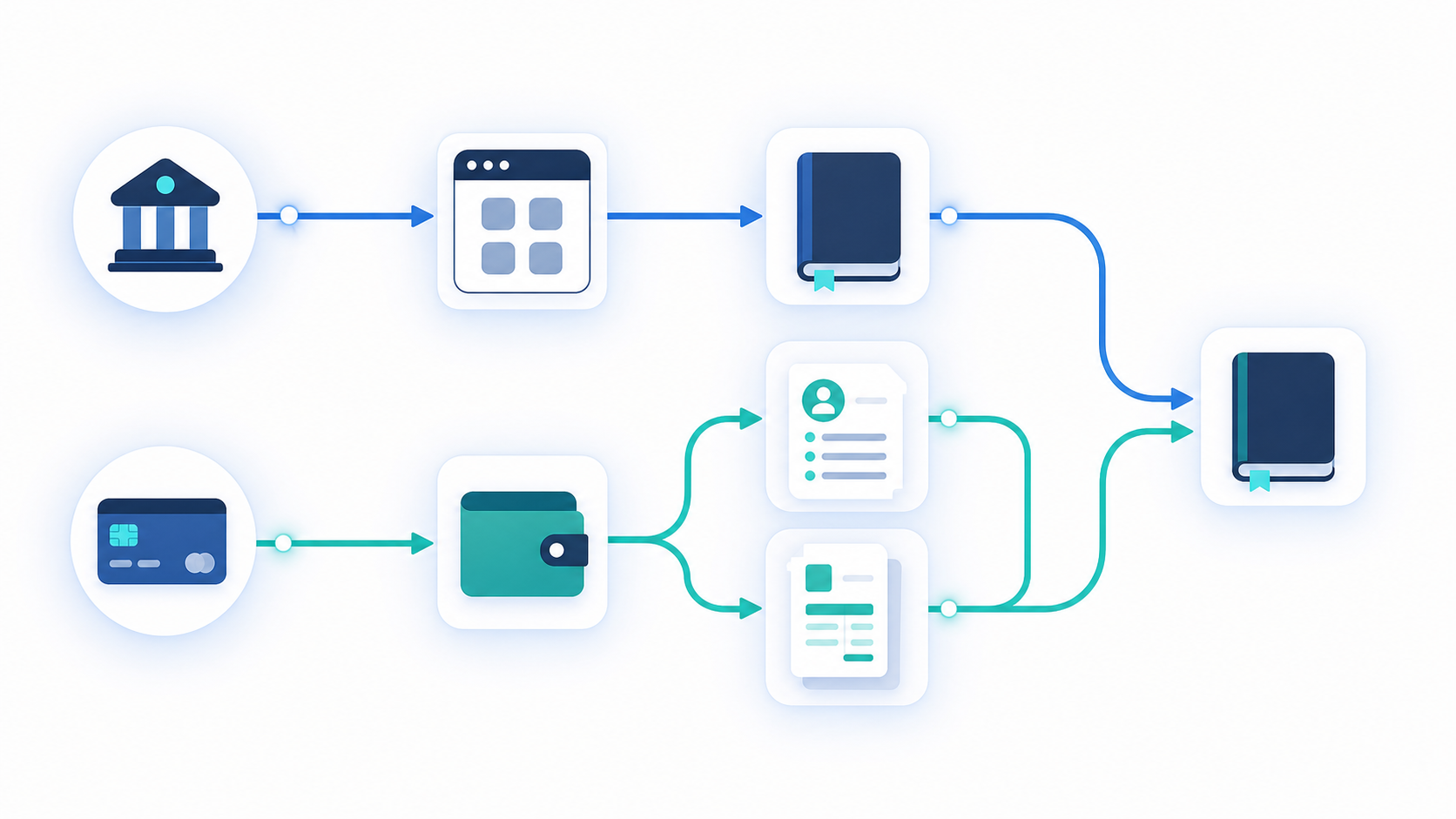
Card transactions and bank transactions look similar at the source: a date, an amount, a merchant. Inside Sage Intacct, they are structurally different objects that write to different modules.
| Attribute | Bank Transactions | Corporate Card Transactions |
|---|---|---|
| Sage Module | Cash Management | Employee Expenses or Accounts Payable |
| Card / Account Type | Registered bank account | Employee-owned (reimbursable) or company-settled card |
| Required Dimension | Typically none (GL account required) | Employee dimension often required for expense records |
| Subledger Impact | Feeds Cash Management subledger | Feeds AP or Expense subledger |
| Common Mistake | Mismatched GL account vs. bank account in Cash Management setup | Posting card charge as a Cash Management payment, which skews the AP subledger |
| Object Creation Trigger | Deposit or payment record at sync time | Identify card program type at onboarding, branch logic before first sync |
Bank transactions route through Cash Management. Your integration creates deposit or payment records against a specific bank account registered in Sage, and the GL account on those records must match the account tied to that bank account in Cash Management setup.
Corporate card transactions take a different path. Depending on the card program, they route through either Employee Expenses (reimbursable, employee-owned cards) or Accounts Payable (company-owned card programs where the company settles the balance). Each module has its own required fields, its own dimension rules, and its own subledger that feeds into the GL. Posting a corporate card charge as a Cash Management payment works technically but skews the AP subledger and makes expense reporting useless.
Here is where dimension requirements also diverge. Employee expense records in Sage often carry an Employee dimension as a required field, while bank transactions typically do not. If your integration applies the same field template to both transaction types (a mistake we break down in our field mapping guide), employee-linked card posts will either fail silently or land without the expected dimension value.
The practical rule: identify the card program type during onboarding, not at sync time. Ask whether cards are reimbursable or company-settled, and branch your object creation logic accordingly before the first transaction posts.
What Breaks Silently in Sage Intacct Integrations
The four failure modes covered above share one trait: none throw a visible error. As a quick reference before go-live testing:
- Invalid or missing dimension value
- Display label stored instead of integration name
- Wrong entity ID on a write
- Duplicate offset entry from auto-generated balancing logic
Test each explicitly before go-live, not during the customer's first close.
hotglue's Approach to Sage Intacct Integration for Fintech Products
Hotglue's Sage Intacct connector is built for fintech teams who need their data to land correctly in Sage, with precision. It handles the parts that quietly break most integrations before anyone notices (usually around close day).
The connector covers GL accounts, dimensions, and reporting period data. Users configure mappings through an embedded widget instead of relying on hardcoded logic, and the widget supports mapping a single source field to multiple target objects simultaneously, a capability we unpack in Hotglue vs Merge for ERP sync. That matters when a card transaction needs to populate both a GL account and a dimension value in one step, and you'd rather not write a novel in Python to make it happen.
For transformation logic that doesn't fit a standard mapping, GluestickAI lets your team describe the logic in plain language and generates ready-to-run Python code with no custom script required and no three-day sprint to handle an edge case.
On data handling: hotglue processes and delivers data without storing it, which fintech customers with data residency requirements will genuinely appreciate (as opposed to just claiming to appreciate it in a procurement questionnaire). Across 38,000+ active tenants and roughly 10 billion records processed weekly, that model has held up.
Final thoughts on Sage Intacct Dimensions, API Design, and Multi-Entity Routing
The Sage Intacct API will accept almost anything you send it, which means the validation work falls on your integration. Pulling the customer's full dimension list at onboarding, storing integration names instead of display labels, and branching your transaction logic by card program type are the moves that keep reconciliation clean. Build these checks in early and your customers will have a much quieter close day. Book a demo with hotglue to see how the connector handles dimension mapping and entity routing out of the box.
FAQ
How should bill payment clearing work in a Sage Intacct integration when the source system only sends one side of the entry?
Post payments through a clearing GL account first, then generate the bank-side entry separately once the transaction settles. The key decision is whether your integration auto-generates the balancing entry or flags it for the user. Auto-generating is cleaner, but if Sage's AP module already posts the offset, you'll end up with a duplicate debit that the ledger accepts without complaint. Ask customers explicitly during onboarding how their AP workflow handles the offset before defaulting to either approach.
What happens when a Sage Intacct dimension value is invalid or missing from a transaction post?
As covered in the Dimensions section above, the full transaction rejects with no error and no partial write. Always pull the customer's full dimension list at onboarding, validate every value against active integration names (not display labels), and test invalid dimension scenarios explicitly before go-live.
How does Hotglue handle GL account subsidiary and currency mapping when a GL account isn't attached to a bank account during a Sage Intacct COA import?
When a COA record isn't tied to a specific bank account at the entity level, there's no implicit routing signal for the integration to read. Hotglue's widget lets end users configure subsidiary-to-entity mappings manually during setup instead of inferring them from the COA structure, and supports mapping a single source field to multiple target objects in one step, so currency and entity context can be set together. Users retain full control over those mappings without requiring code changes on your side.
Corporate card transactions vs. bank transactions in Sage Intacct: which API objects do each use and why does it matter?
Bank transactions write to Cash Management against a registered bank account. Corporate card transactions route to either Employee Expenses (reimbursable, employee-owned cards) or Accounts Payable (company-settled card programs) depending on the card type. Posting a corporate card charge as a Cash Management payment works at the API level but skews the AP subledger and breaks expense reporting. Employee Expenses records also often require an Employee dimension that bank transaction templates don't carry, so applying the same field template to both types causes silent failures. Identify the card program type during onboarding, before the first sync runs.
How does Sage Intacct's XML API authentication differ from standard OAuth, and what does that mean for your integration onboarding flow?
Sage Intacct uses session-based XML authentication instead of OAuth. Every API call wraps credentials inline in the XML envelope, with no upfront token exchange. Setup requires a dedicated web services user in the Sage admin, a sender ID issued by Sage, and company-level authorization by your customer before any calls succeed. That last step is easy to miss: your customer must authorize your sender ID inside their Sage settings, so build that explicitly into your onboarding checklist or your first API call will fail with no obvious reason why.