Your user didn't see an error. They just noticed their QuickBooks data stopped updating, filed a support ticket, and now they're wondering how reliable your product actually is. OAuth token expiry is one of the most common reasons embedded integrations fail quietly, and the fix isn't complicated once you know what you're actually dealing with.
TLDR:
- OAuth token expiry in background integrations is a silent data problem, not a login problem: your sync fails without warning.
- Token lifetimes vary wildly across APIs: HubSpot refresh tokens auto-rotate roughly every 6 hours, QuickBooks Online refresh tokens last up to 100 days.
- Refresh token rotation (now best practice per RFC 9700) breaks integrations if two sync jobs fire simultaneously for the same tenant.
- Fix silent failures with three patterns: centralized token storage, per-tenant single-flight refresh locks, and a 60-second proactive buffer window.
- Hotglue handles proactive refresh, rotation collisions, and encrypted per-tenant token storage across its full connector catalog.
What OAuth Token Expiry Actually Means in a Third-Party Integration Context
When a user connects their QuickBooks or Salesforce account to your product, OAuth issues two credentials: a short-lived access token and a longer-lived refresh token. The access token is what your integration actually sends with every API request, proving in that moment that your app has permission to read or write that user's data.
Access tokens expire fast. QuickBooks Online access tokens last one hour, after which every API call returns a 401 until a new one is minted. That's fine for a user sitting at a browser who gets redirected to log in again. For a background sync running at 2 AM, there's no user to redirect.
Token expiry in an embedded integration context is a background data problem, not a login problem. Your sync quietly stops, records go stale, and your end user has no idea anything broke until they notice a discrepancy, sometimes days later. Nothing builds customer trust quite like a support ticket that opens with “my data hasn’t updated since Tuesday.”
How Token Lifetimes Vary Across Major APIs
Token lifetimes vary widely across providers, and there's no universal standard. A HubSpot refresh token expires in hours; a QuickBooks Online refresh token can last up to 100 days, which matters if you're planning to integrate QuickBooks with your SaaS platform. Running a multi-connector stack means each connection expires on its own schedule, with its own revocation rules.
| API | Access Token Lifetime | Refresh Token Lifetime |
|---|---|---|
| QuickBooks Online | 60 minutes | Up to 100 days |
| Salesforce | 2 hours (configurable) | Until revoked or session ends |
| Xero | 30 minutes | 60 days |
| HubSpot | 30 minutes | 6 hours (auto-rotated) |
| Shopify | Varies by auth type | Until manually revoked |
Some providers also revoke tokens early for reasons unrelated to time: a user changes their password, an admin removes app access, or the provider flags unusual activity. Your integration needs to handle both expiry and early revocation gracefully.
Why Expiry Failures Are Silent and Dangerous
At the API layer, a 401 response is unambiguous. At the product layer, it often disappears entirely. If your integration catches that error and logs it quietly, or retries without escalating, the failure becomes invisible. The sync job either halts silently or skips records without flagging why.
Consider what that looks like concretely: a QuickBooks sync stops mid-run at 2 AM after a token expires. Invoices created after that point never reach your product. Your user spends the next week cross-checking accounts against a ledger that is silently 72 hours out of date, finds the gap only when a payment bounces, and files a support ticket blaming your product for a billing error you had no visibility into.

As DigitalWerks notes, "an API integration can run normally for weeks, then begin returning unauthorized errors because an access token expired. If the workflow treats every 401 response as a generic retry, it may waste requests, hide a revoked connection, or keep a broken sync quiet until someone notices missing data."
Your end user sees a stale dashboard. Your customer success team gets a confused support ticket. By the time anyone traces it to a token, the damage to trust is already done, which is one more reason teams reconsider building SaaS integrations in-house.
The Two-Token Model: Access Tokens vs. Refresh Tokens
Access tokens and refresh tokens have distinct jobs. An access token is the credential your integration sends with every API request, proving in that moment that your app has authorization. Refresh tokens work differently: they never get sent to resource servers. Instead, they go to the authorization server to mint a fresh access token once the old one expires.
The practical consequence is that refresh tokens need much stricter handling. If an access token leaks, it expires in minutes or hours. If a refresh token leaks, an attacker can silently keep generating new access tokens indefinitely without triggering any failed login alerts.
Your code needs to know when to use each token, store them separately, and never conflate the two roles, a nuance that becomes even more important once you weigh webhooks against scheduled syncs for your integration architecture.
How to Check Whether an OAuth Token Has Expired
There are two broad categories of OAuth access token, and they expire differently in practice.
JWT tokens embed their expiry directly in the payload. You can base64-decode the middle segment and read the exp claim, which is a Unix timestamp. Compare it to the current time and you know exactly how much life the token has left.
Opaque tokens give you nothing to decode. The reliable approach is to store the expires_in value from the token response, calculate an expires_at timestamp at the moment you receive it, and check that stored value before making API calls. Some providers also support a token introspection endpoint to confirm whether a token is still valid server-side.
A one-time expiry check is not enough in production, though. Consider two real risks:
- Clock skew between your server and the authorization server can run anywhere from a few seconds to a few minutes, meaning a token you calculate as valid might already be rejected by the time the request lands.
- Race conditions in multi-tenant systems can cause a token to pass a validity check and then expire before the actual API call completes.
The standard fix is to refresh proactively using a small buffer window, typically 30 to 60 seconds before the calculated expires_at, instead of waiting for a 401 to tell you it's gone. That same discipline matters when you're doing connector maintenance after API changes.
Refresh Token Rotation: What It Is and Why It Matters for Integrations
Refresh token rotation is a security control where using a refresh token invalidates it immediately and issues a brand new one in its place. The idea is sound: even if an old refresh token leaks, it's worthless the moment it gets used.
RFC 9700, published by the IETF in January 2025, formally recommends this pattern with automatic reuse detection as best current practice for OAuth 2.0. If a provider detects that an already-used refresh token is presented again, it should treat that as a compromise signal and revoke the entire token family. Not all providers currently implement reuse detection, but it is the recommended behavior, and you should not depend on its absence as a safety net.
For embedded integrations, rotation creates a specific reliability risk. If two sync jobs fire for the same tenant simultaneously, both might try to refresh using the same refresh token. Whichever request lands second will present a token the provider just invalidated, permanently revoking the connection and forcing the tenant to re-authenticate manually. That is a support ticket you did not earn.
The fix is to serialize refresh requests per tenant using a lock, so only one process can exchange a refresh token at a time. Once you have the new token pair, write both values atomically before releasing the lock. With rotation in place, stale token storage becomes a breaking bug, not merely a performance concern.
Common Refresh Token Failure Modes Teams Build Around
These failures share a pattern worth naming: they rarely throw obvious errors, and they rarely happen at convenient times.
The five failure modes most teams hit
- Refresh token expired after inactivity. Many providers revoke refresh tokens if they go unused for a set period. A tenant who pauses using your product for a month might return to find their connection dead, with no clear explanation why.
- Rotation collision from concurrent jobs. Two sync jobs fire simultaneously, both attempt to refresh the same token, and the second request presents an already-invalidated token. The provider revokes the whole session and the tenant must re-authenticate manually.
- Scope changes breaking existing tokens. An admin updates your OAuth app's permissions, or a user revokes a specific scope, which is a scenario worth planning for before you offer a HubSpot integration inside your product. The refresh token still works, but the new access token no longer covers the endpoints your integration calls. You get 403s instead of 401s, which read like a data access issue and not a token scope issue.
- Password reset or admin deauthorization. A user changes their password, an IT admin removes your app from an approved list, or a provider's security policy flags the session. The refresh token is revoked mid-flight with no warning to your integration layer.
- Token storage race condition. Two processes read the same stored refresh token, one refreshes successfully and writes the new pair, and the other overwrites it with a stale value. Your next sync fails with a token that looks valid but was already rotated out.
Each of these fails quietly unless you've built explicit detection for it.
The Right Patterns for Production-Grade Refresh Token Handling
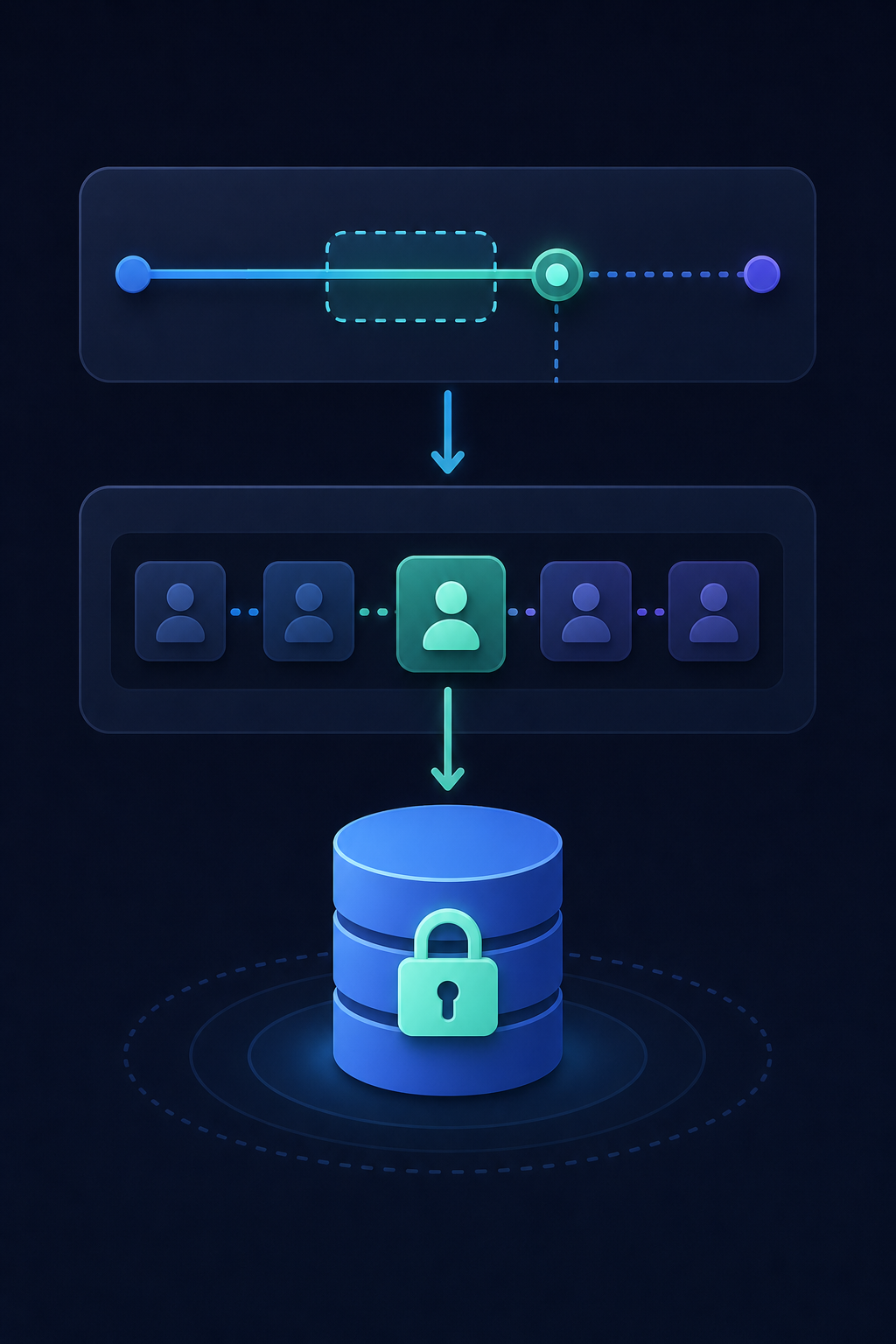
Three patterns separate integrations that degrade quietly from ones that hold up across thousands of tenants.
Centralize token state
Store access and refresh tokens in one authoritative location, not scattered across worker memory or environment variables. Every sync job reads from and writes to this single source. When a rotation produces a new token pair, that write propagates to all workers immediately. Distributed storage is where stale-token overwrites happen.
Single-flight refresh
Only one process should exchange a refresh token at a time, per tenant. Wrap your refresh call in a per-tenant lock. Workers that arrive while a refresh is in-flight wait, then read the newly written token instead of firing a second exchange. This is the direct fix for the rotation collision failure mode.
Retry-once on 401, but treat it as a fallback
A 401 response should trigger one attempt to refresh and retry the failed request. One attempt, not a loop. Proactive refresh is safer in scheduled sync environments: calculate an expires_at when you store each token, then refresh before sync jobs start using a 60-second buffer window. Reactive refresh waits for a live request to fail, which mid-run can mean partial data before the failure surfaces. The Xero connector avoids this by refreshing proactively.
Jobs check token freshness before starting, a lock prevents concurrent exchanges, and a 401 handler catches the edge cases that slip through anyway.
Surfacing Token Errors to End Users Without Killing the Experience
When re-authorization is genuinely required, the user experience around that moment matters as much as the technical recovery path. A broken sync is recoverable. A user who feels confused or blamed is harder to win back.
The core principle: only surface an auth error to the user when your system cannot resolve it silently. If your token refresh succeeded, the user should never know anything happened. If it failed permanently, tell them once, clearly, and make the fix one step.
A few patterns that work well in practice:
- In-app connection status indicators that show "connected" vs. "reconnection required" without burying it in a settings page. If a user visits your product and their sync is broken, they should see that before they notice stale data.
- Deep links directly to the re-authorization flow, not to a generic integrations page. Every extra click adds drop-off, a lesson that applies just as much to a Shopify connector as to any other integration. The prompt should land the user on the OAuth consent screen, not make them find it themselves.
- Email or in-app nudges for passive users who may not log in frequently. One clear notification with a direct reconnect link beats a silent failure that surfaces weeks later.
- Avoid error language that sounds like the user did something wrong. "Your QuickBooks connection needs to be refreshed" lands better than "Authentication failed."
Ownership here is straightforward: your backend or platform engineering team owns token handling, proactive refresh, and storage security. Your product team owns what the user sees when something breaks — the status indicators, the re-auth prompts, the error copy. Customer success is the one who gets the ticket when both of those fail, which is a good incentive to get it right the first time.
Token Storage Security in Multi-Tenant Embedded Integrations
Storing tokens for one user is a solved problem. Storing them for ten thousand tenants, each with their own OAuth credentials for their own connected accounts, is a different class of responsibility.
The non-negotiable baseline: tokens must be encrypted at rest. Access tokens and refresh tokens are bearer credentials. Whoever holds one has access to that tenant's data in the connected system. Storing them as plaintext in a database column is the kind of shortcut that surfaces in the worst possible way.
RFC 9700 is explicit about treating refresh tokens with the same care as passwords. That means encryption at rest, strict access controls on which services can read them, and audit logging on storage writes. Client-side storage, such as browser local storage or cookies without proper flags, is off the table for refresh tokens entirely. If a token can be extracted from the browser, it can be stolen without ever touching your servers.
In a multi-tenant system, tenant isolation compounds the storage requirement. A storage bug that lets one tenant's token query return another tenant's credentials is both a security incident and a compliance event. Encrypted storage per tenant, with access scoped to the requesting tenant context, is the minimum bar.
If you're assessing an embedded integration layer, the right questions are: where are credentials stored, how are they encrypted, and what prevents cross-tenant reads at the application layer? These are the same questions worth asking about any QuickBooks connector you add to your stack.
How hotglue Handles OAuth Token Expiry Across Tens of Thousands of Tenants
Proactive refresh, single-flight locking, encrypted per-tenant storage, and surfacing failures to users all represent real engineering work. You need to do it for each connector you support, and then again whenever any of those APIs change their token behavior.
Hotglue handles this across the full connector catalog. QuickBooks Online, Salesforce, HubSpot, Xero, Shopify, and hundreds more all have different token lifetimes, rotation behaviors, and revocation triggers. The Salesforce connector, for example, supports PKCE authentication to meet Salesforce's 2026 External Client Apps PKCE requirement for connected apps, with no extra configuration needed on your end.
At 38,000+ tenants and 10 billion weekly records, token reliability is a core infrastructure concern, not a theoretical one. Job health monitoring surfaces sync failures immediately, so issues never sit quiet until a user files a support ticket. That is part of the same rigor behind hotglue's SOC 2 Type II compliance. A partial sync failure never silently succeeds, so you are never left wondering whether your data is complete.
The pricing model matters here too. Because hotglue charges per active tenant and not per data volume, aggressive proactive refresh strategies do not cost you more. Refresh early, buffer generously, retry safely, without watching a usage meter climb.
Final Thoughts on Handling OAuth Token Expiry in Production Integration Work
A lot of integration reliability comes down to respecting the two-token model, storing credentials properly, and not waiting for a 401 to tell you something broke. The teams that get this right build it once and stop thinking about it. If you want a closer look at how this gets handled at scale, book a demo.
FAQ
How does OAuth2 token storage and refresh behavior work in a multi-tenant embedded integration, and do I need to share credentials with my integration layer?
Yes, an embedded integration layer like Hotglue holds OAuth credentials on your behalf. That's the point. Each tenant's access token and refresh token are encrypted at rest, scoped to that tenant's context, and never readable across tenants. Hotglue manages proactive refresh with a buffer window before expiry, single-flight locking per tenant to prevent rotation collisions, and encrypted per-tenant storage, so your engineering team does not own any of that token lifecycle complexity.
How do sync errors and refresh token failures get surfaced to end users so they can self-correct without involving my support team?
The key is only surfacing an auth error when your system cannot resolve it silently. If the token refresh succeeded, the user should never know anything happened. When re-authorization is genuinely required, the right pattern is an in-app connection status indicator showing "reconnection required," paired with a deep link directly to the OAuth consent screen (not a generic settings page), and an email or in-app nudge for users who log in infrequently. Hotglue's job health monitoring catches sync failures immediately so your CS team sees the issue before the end user files a confused support ticket.
What is the difference between a refresh token expiring from inactivity versus a rotation collision, and why does it matter for embedded integration reliability?
Inactivity expiry happens when a tenant stops using your product long enough that their refresh token exceeds the provider's idle window; the connection goes dead silently and the user returns to stale data. A rotation collision is a concurrent race condition: two sync jobs fire for the same tenant at the same time, both attempt to exchange the same refresh token, and the second request presents an already-invalidated token, permanently revoking the session. Both fail quietly, but rotation collisions require a per-tenant lock on refresh requests to fix, while inactivity expiry requires proactive user notification before the damage surfaces.
How do I handle OAuth token expiry for background syncs across connectors like QuickBooks Online, Xero, and HubSpot that each have different token lifetimes?
Store an expires_at timestamp for each token at the moment you receive it, then refresh proactively using a 60-second buffer before any sync job starts. Do not wait for a 401 to tell you the token is gone. The challenge in a multi-connector stack is that QuickBooks Online refresh tokens last up to 100 days, Xero's last 60 days, and HubSpot's rotate every 6 hours, so each connection expires on its own schedule with its own revocation rules. Hotglue manages this across the full connector catalog automatically, so you do not need to build and maintain separate refresh logic per API.
What are the security requirements for refresh token storage in a multi-tenant SaaS product under RFC 9700?
RFC 9700, published by the IETF in January 2025, formally recommends treating refresh tokens with the same care as passwords: encrypted at rest, strict access controls limiting which services can read them, and audit logging on storage writes. Client-side storage in browser local storage or cookies without proper flags is off the table for refresh tokens entirely. In a multi-tenant system, you also need tenant isolation at the application layer, because a storage bug that returns one tenant's credentials in another tenant's query is both a security incident and a compliance event.