If you're adding AI features to your B2B product, you're probably going to run into a moment where an agent needs data from a customer's connected system and your integration layer was never built to handle that. Most teams hit this wall and realize their sync pipelines and their AI workflows need to share the same foundation. Using scaffolding tools, open-source connectors, and a structured CLI workflow gets you there without starting from scratch.
TLDR:
- "Build integrations with AI" means two things: using AI to build faster, and structuring pipelines so AI agents can consume them at runtime.
- 10 AI models plus 10 tools equals up to 100 custom integrations without MCP; the protocol collapses that to N+M.
- Open-source Singer connectors give you full visibility into data shape and schema, which matters when AI agents query live customer systems.
- AI agents need per-tenant token isolation at the infrastructure level, or one tenant's credentials can bleed into another's.
- Hotglue's
cookiecutterCLI, GluestickAI transformation layer, and Composite MCP endpoint handle connector scaffolding, field mapping, and scoped agent auth across tenants.
What It Means to Build Integrations with AI
"Build integrations with AI" means two distinct things in 2026, and conflating them is where most teams go wrong.
The first meaning: using AI to speed up how you build integrations. Think code generation, field mapping suggestions, and connector scaffolding that cuts weeks off your development cycle. The second: structuring your integrations so that AI agents can actually consume them, meaning your pipelines become the data layer that LLMs query and act on at runtime.
Both matter. A lot of the current conversation treats them as the same problem, but they require different architectural decisions and different tooling choices.
For product teams at B2B SaaS companies, this distinction is more than academic. If you're building integrations so customers can connect QuickBooks or Salesforce to your product, you need the first. If you're shipping an AI-powered feature that reads from those connected systems to answer questions or trigger actions, you need both. The person who ends up owning both sides of this is usually the CPO or Head of Partnerships, whoever agreed to put integrations on the roadmap and now has to explain why they keep showing up on it.
The Old Way of Building Integrations (and Why It Breaks at Scale)
Most product teams start the same way: one customer needs a Salesforce sync, so an engineer builds it. Three months later, another customer needs QuickBooks. Then Shopify. Then NetSuite. Each one is a custom adapter, hand-coded against a specific API version, with its own authentication logic and field mapping assumptions baked in. (Congratulations, you're now also an integration company. Nobody asked for this.)
This works until it doesn't. Salesforce deprecates an endpoint. QuickBooks changes its OAuth flow. A customer's Shopify store adds Loop Subscriptions, and suddenly your connector breaks in ways you didn't anticipate.
The real cost is the ongoing maintenance: schema drift, API versioning, connector rebuilds that consume weeks of engineering time per incident. At five integrations that's manageable. At forty, it's a second product your team never agreed to build, and it usually lands on whoever owns partnerships or product to explain why the roadmap is 60% plumbing. (Integration debt: the gift that keeps on taking.)
The N×M Problem: Why AI Agents Make Integration Complexity Worse Before Better
Adding AI agents to your stack doesn't simplify your integration problem. It multiplies it.
The math is straightforward and painful: if you have 10 AI models and 10 business tools your customers use, you're looking at up to 100 custom integrations to wire them together. Every new model or tool adds another row and column to that grid. As one analysis puts it, MCP changes that equation from N×M to N+M: one protocol, any model, any tool. But getting there requires your connectors to be structured in a way that agents can actually consume.
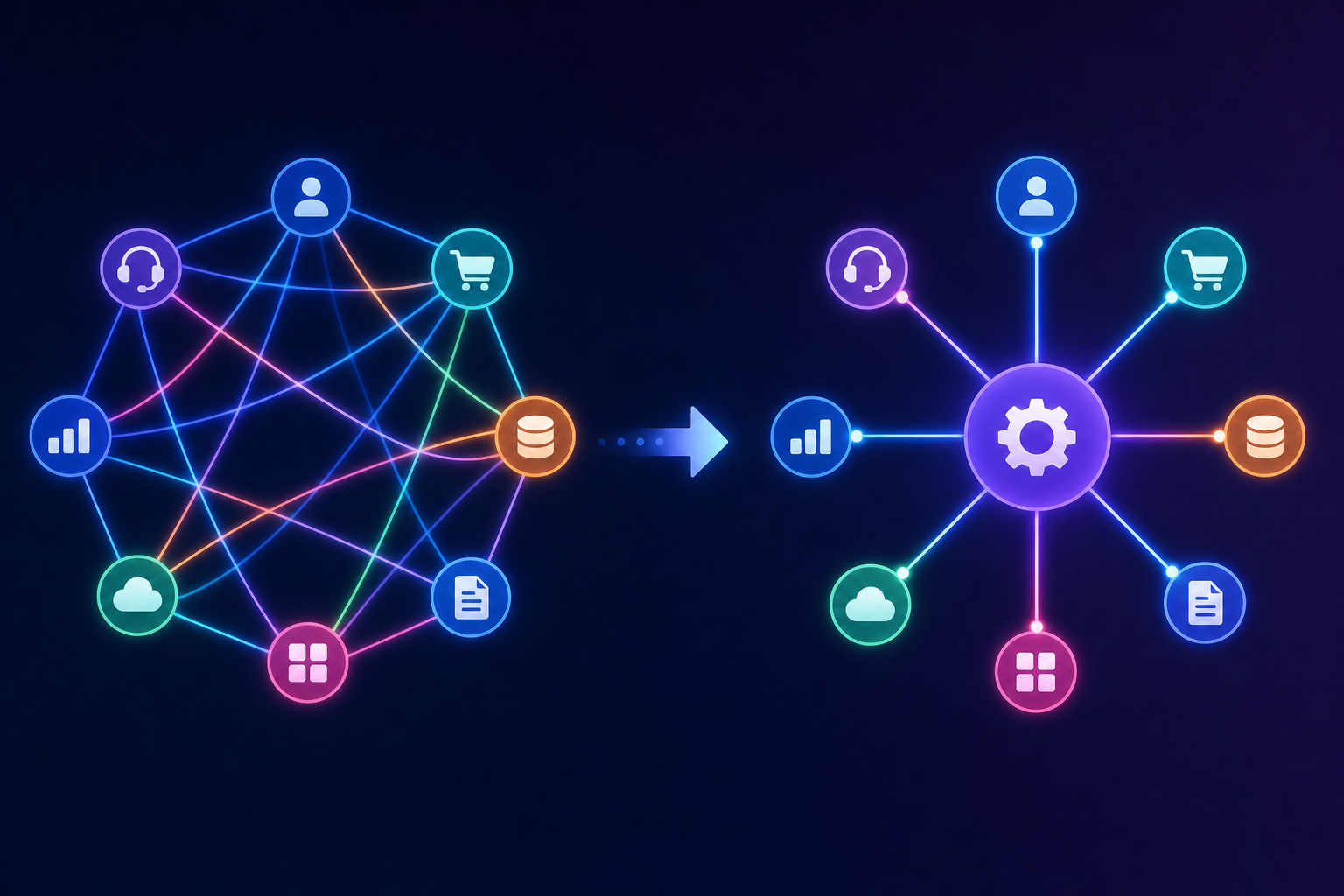
Most teams learn this the hard way. You ship an AI feature that needs to read from a customer's QuickBooks. Then a customer asks why it doesn't work with their NetSuite. Then another wants Salesforce context pulled in. Each one is a separate auth flow, a separate data shape, a separate maintenance burden running in parallel with your existing sync pipelines.
The N×M problem isn't theoretical. It's the reason teams that add AI capabilities without rethinking their integration layer end up with two fragile systems instead of one.
What MCP Is and Why It Changes the Integration Architecture
MCP is an open standard Anthropic introduced in November 2024. The idea is simple: instead of building one connector per model-tool combination, you write one MCP server per system and any compatible AI model can use it. By December 2025, it was donated to the Linux Foundation and had become vendor-neutral infrastructure, with OpenAI, Google, and Microsoft all supporting it.
Architecturally, MCP works through clients and servers. The MCP client lives inside the AI agent or LLM host. The MCP server wraps a business system and exposes its capabilities as named tools. When an agent needs to query a customer's QuickBooks data, it calls the QuickBooks MCP server's tools directly, with no custom glue code between them, collapsing what one SaaS analysis describes as a sprawling N×M grid of custom integrations down to a single protocol.
For a B2B SaaS product team, this creates a real architectural shift tied to MCP auth in embedded iPaaS: your connectors now need to serve two consumers. The traditional sync pipeline delivers data to your backend on a schedule. The MCP layer gives AI agents live data access to that same system at runtime, on demand, with the customer's own credentials scoped correctly per tenant.
Traditional Integration vs. MCP-Based Architecture
| Factor | Traditional Custom Connectors | MCP-Based Architecture |
|---|---|---|
| Integration count | N×M (e.g. 10 models × 10 tools = 100 integrations) | N+M (10 models + 10 tools = 20 connections) |
| Connector reuse | One connector per model-tool combination | One MCP server per system, any compatible model |
| Auth model | Custom OAuth flow per connector | Scoped token per tenant via MCP token endpoint |
| Runtime data access | Scheduled sync pipelines | Live, on-demand queries at agent runtime |
| Maintenance burden | High: schema drift and API versioning per connector | Lower: protocol-level abstraction reduces connector rebuilds |
| Vendor neutrality | Depends on connector implementation | Open standard (Linux Foundation, supported by OpenAI, Google, Microsoft) |
Open-Source Connectors as the Foundation for AI-Ready Pipelines
Open-source connectors matter here for a specific reason: when an AI agent is consuming your integration layer at runtime, you need to know exactly what data is being extracted, in what shape, and under what conditions. A black-box connector gives you none of that.
Singer is the spec that makes this tractable. As the Singer spec describes, it defines how independent extraction scripts (taps) and loading scripts (targets) communicate via a standardized JSON format over stdout and stdin. A tap and target written by different teams still work together as long as both follow the spec. SCHEMA, RECORD, and STATE messages carry the pipeline's contract, making connectors inspectable and forkable without reverse-engineering anything.
For AI-ready pipelines, this composability is the foundation. When your QuickBooks connector is an open-source Singer tap, you can read the field definitions, modify the schema stream to match your unified data model, and extend the connector when a customer's setup requires it. Hotglue's connector library is built on this ecosystem, part of why open-source data integration keeps your team from ever being locked into whatever shape the vendor decided to export.
Using AI to Accelerate Connector Development: Cookiecutter and CLI Patterns
The fastest path from an API spec to a working connector isn't writing code from scratch. It's scaffolding the structure, then filling in the specifics.
Hotglue's CLI includes a create tap via cookiecutter command that generates a Singer-compatible connector skeleton from a template. You get the boilerplate: schema declarations, state handling, authentication wiring. From there, AI code generation tools handle the repetitive parts, translating API response shapes into RECORD messages without hand-writing every field.
The loop looks like this:
- Run the CLI to scaffold the tap structure
- Point an AI tool at the API docs to generate stream definitions
- Run the Singer utils to validate output format
- Test against a sandbox before promoting to production
Hotglue holds sandboxes for third-party systems, so you're not waiting on a customer to provision test credentials. That alone cuts days off a typical connector build cycle, which can go from API access to live connector in one to two weeks.
AI-Assisted Field Mapping and Data Transformation
Field mapping is where most integration projects stall. Two systems, two schemas, and a customer who calls every field something slightly different. Manually matching "Invoice Date" against transaction_date against doc_date across a dozen connectors eats engineering hours without shipping anything new.
GluestickAI handles this by letting you describe the transformation in plain language and generating the Python code to execute it, alongside JavaScript and TypeScript support for field mappings for teams who prefer those languages. Complex joins, nested JSON reshaping, deduplication logic across email and contact fields: written as a prompt, returned as runnable code. Customer data is never stored or used to train the model.
For deduplication, Hotglue's record-matching engine supports multi-field logic out of the box. Matching on email alone misses duplicates when contact details vary; combining fields catches the edge cases that single-field logic drops silently.
The payoff is fewer engineering cycles spent on per-customer schema exceptions, and fewer support tickets when, after you integrate QuickBooks with your SaaS platform, field names don't map cleanly to your data model on the first sync.
Managed Authentication and Security for AI Agent Integrations
When a human user connects their QuickBooks, they authenticate once and move on. When an AI agent needs to query QuickBooks across fifty customer tenants simultaneously, the auth problem scales in ways OAuth wasn't originally designed for.
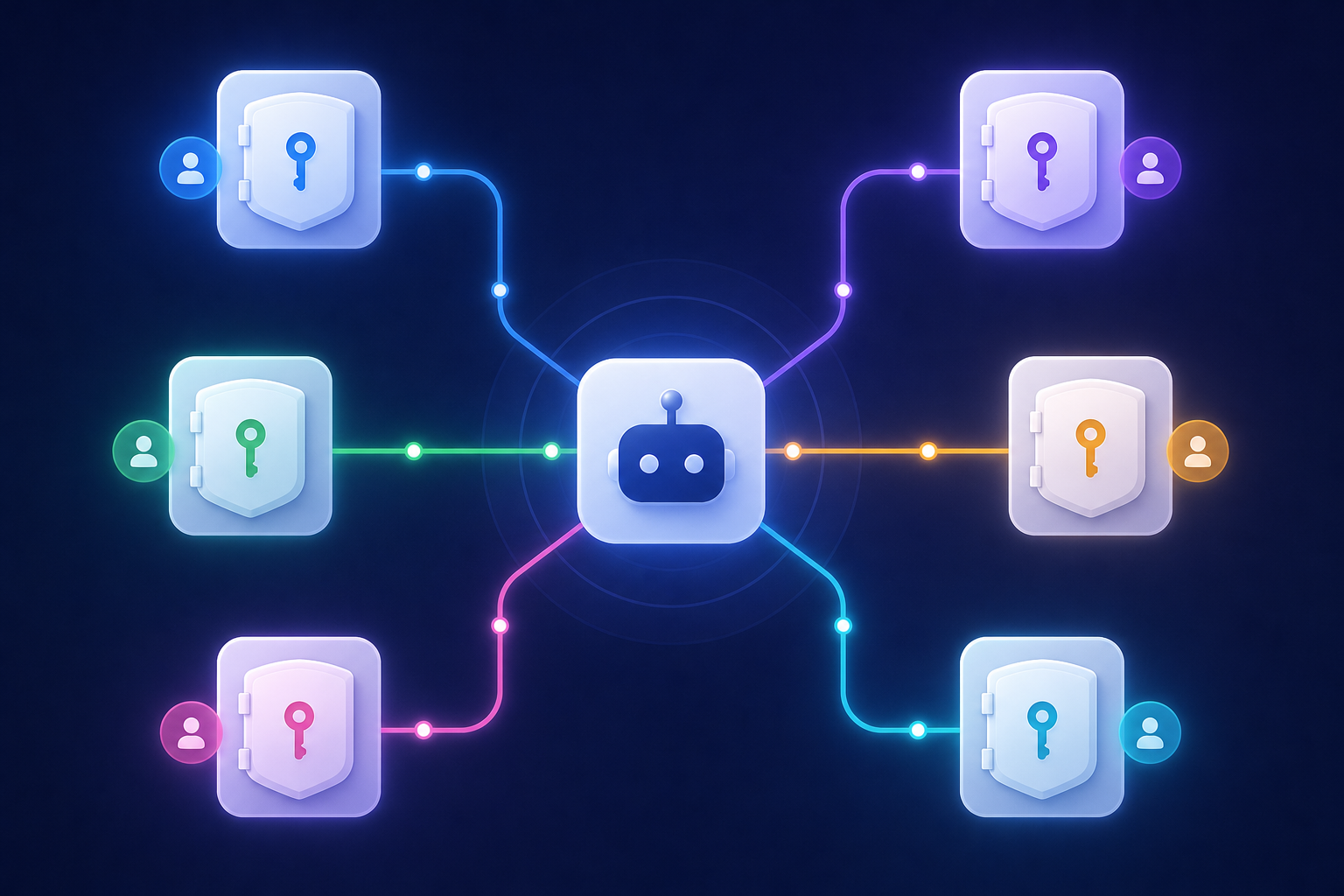
The core requirement is per-tenant token isolation. Each customer's credentials must be scoped independently, so an agent acting on one tenant's data cannot bleed into another's. Hotglue handles this through its MCP token endpoint, which issues a scoped token per tenant that the agent uses to identify and call only the tools that tenant has linked.
Two things this removes from your engineering backlog:
- Re-implementing OAuth flows for every connector an agent might touch, a pain point detailed in why unified APIs fail CRM integrations
- Building your own token storage and refresh logic per customer
Hotglue is SOC 2 Type II and GDPR compliant by design and never stores customer data, processing and delivering it directly to you. For AI agent workflows, that matters: the agent gets live access to a customer's system without your backend becoming a long-term store of sensitive customer data.
How to Structure Integration Environments When AI Is in the Loop
AI agents don't respect the boundary between "testing a workflow" and "writing to a live customer's accounting system." That boundary has to be enforced at the infrastructure level, not assumed.
The minimum viable environment setup when AI is in the loop:
- A development environment with its own API keys, connectors, and tenant data separate from production, so AI-generated mappings can fail safely without touching real records.
- Sandbox credentials for third-party systems, so test syncs stay isolated and don't corrupt customer data.
- A staging environment where AI-triggered flows run against realistic data volumes before any production promotion.
Hotglue keeps development and production environments separated by default, with Git integration and automatic commits on ETL scripts so you can roll back a transformation if an AI-generated mapping produces unexpected output. Combined with Hotglue's own third-party sandbox access and a unified schema you can customize, your team isn't waiting on customer-provisioned test accounts before validating a flow.
The specific risk with AI agents is non-determinism. A human triggers a sync intentionally. An agent might trigger one as a side effect of answering a question, at 2am, against a tenant you weren't expecting. Scoped per-tenant tokens and separate environments keep that blast radius small.
How hotglue Approaches Building Integrations with AI
Hotglue's Composite MCP endpoint gives each tenant a single authenticated MCP URL. Tools are namespaced from whatever connectors that tenant has linked, so an AI agent calling notion.search or quickbooks.invoices scopes automatically to that customer's credentials, with no extra auth plumbing required. The token endpoint works alongside existing widget and Magic Link auth flows.
Connectors built through that scaffolding process slot directly into the Composite MCP endpoint: once a tap is validated and a tenant links it, the agent can call its tools immediately under that tenant's scoped credentials, with no additional wiring between the connector and the auth layer. Sandboxes for third-party systems mean that cycle never stalls waiting on test credentials.
GluestickAI handles the transformation layer: describe the mapping in plain language, get runnable Python back. Customer data never trains the model.
The connector library includes 650+ open-source connectors, with native support for Singer and Airbyte YAML connectors, across accounting, CRM, e-commerce, payroll, and more. Hotglue currently processes approximately 10 billion records weekly across 38,000+ active tenants. When AI agents amplify data movement through those pipelines, volume-based pricing becomes a liability. Hotglue's pricing is based on active tenants, not data volume, so costs scale with your customer count and not with how aggressively an agent queries their systems.
Final Thoughts on Building Integrations with AI in Your Stack
Building integrations with AI is two jobs running in parallel: cutting the time it takes to ship connectors, and making sure those connectors work as a live data layer for your agents. Skipping the second part is what turns a promising AI feature into a support burden six months later.
Hotglue covers both sides in one product: CLI-scaffolded connectors, AI-assisted field mapping with GluestickAI, MCP-native agent auth through Composite MCP, and tenant-scoped security. You don't have to stitch together separate tools or write your own auth layer. If you're a CPO or Head of Partnerships at a B2B SaaS company and integrations are eating your roadmap, book a hotglue demo and see how fast the problem shrinks.
FAQ
What are MCP servers and why are they becoming important for SaaS integrations in 2026?
MCP (Model Context Protocol) is an open standard that lets any compatible AI agent connect to any business system through a single protocol, replacing the need for one custom connector per model-tool combination. For SaaS product teams, this matters because every AI feature you ship that reads from customer systems (QuickBooks, Salesforce, Shopify) previously required its own auth flow and data pipeline; MCP collapses that into N+M connections instead of N×M. Hotglue's Composite MCP endpoint gives each tenant a scoped MCP URL so agents automatically query only that customer's connected tools, with no extra auth plumbing.
Which embedded iPaaS platforms support AI agent and MCP authentication workflows?
Hotglue supports MCP authentication workflows, so AI agents and LLM-based tools can authenticate with third-party systems through Hotglue connectors. Its MCP token endpoint issues a scoped token per tenant, and the Composite MCP endpoint exposes only the tools that tenant has linked. It works alongside existing widget and Magic Link auth flows, so you don't rebuild OAuth for the agent.
How do you set up and test integrations across separate development, sandbox, and production environments to avoid impacting live customer data?
The minimum setup is a development environment with isolated API keys and tenant data, sandbox credentials for third-party systems, and a staging environment where AI-triggered flows run against realistic data volumes before production promotion. Hotglue keeps development and production environments separated by default, with Git integration and automatic commits on ETL scripts so you can roll back an AI-generated mapping that produces unexpected output. Hotglue also holds its own third-party sandboxes, so your team isn't blocked waiting on a customer to provision test credentials.
What is embedded ETL and how is it different from a traditional iPaaS for SaaS products?
Embedded ETL sits inside your product and handles extraction, transformation, and loading on behalf of your end users: your customers connect their QuickBooks or Salesforce within your web app, and Hotglue manages auth and data sync without them leaving your product. A traditional iPaaS is typically built for internal workflow automation between systems your company controls, not for customer-facing integrations at the tenant level. Hotglue positions as an embedded ETL tool, with a configurable Python transformation layer and tenant-based pricing designed for the second case.
Can I build integrations with AI tools without writing connector logic from scratch?
Yes. Hotglue's CLI includes a create tap via cookiecutter command that scaffolds a Singer-compatible connector skeleton, and AI code generation tools can translate an API spec into working stream definitions from there. GluestickAI handles the transformation layer separately: describe a field mapping or deduplication rule in plain language and get runnable Python back, without your customer data ever touching a training set.